These days everyone uses a mobile, laptop, or PC and everyone has personal or official data and wants this data safe & secure under a password. For this purpose, different devices do have archive folders. If you don’t have this luxury on your device and are looking for an app that can give you this luxury of hiding all your important data in an archive then Zarchiver Apk will put an end to your search.
Zarchiever Apk allows its users to compress & decompress different files, archive different files, and view different folders of compressed or decompressed files. All this and much more on your mobile phone. Moreover, this app also allows you to extract different zip files and other such sorts of files on your mobile phone.
This is much more than a file archiver, this also allows you to manage your files as well folders of your external & internal storage. Hence serving as a file manager. Try it once if you want to zip or unzip any file, I guarantee you that you will find it the best app when it comes to zipping or unzipping files on android mobile phones. One must allow this app to access both memories of your device( i.e internal memory & SD card) for proper functioning.
Now you are no more required to move the files or folder of Zip files to a computer or laptop for unzipping them. Rather you can do all the zipping and unzipping of files on your mobile.
Feature of Zarchiver APK
This app is full of amazing and exciting features which enable its users to zip, unzip, compress, decompress and manage archived files on a mobile phone without any internet connections. If you are thinking that doing all these do require plenty of features in the app, then you are thinking absolutely right. this app does contain plenty of features and a few of them are really necessary to discuss here.
Compress or Decompress
Compressing or decompressing features come into play when you have to post a large file on the internet on any platform or extract a large file from the internet. If you are sharing a large file then you have to compress the file & if you have downloaded or extracted a large compressed file then you have to decompress it. These compressed files are sometimes split into small files which are portions of this file. These split files fall in the category of 7zip splits.
Zarchiver is an app that can compress files into different zip formats. These formats include 7zip, XZ, gzip, Iz4, zip, bz2, zstd, and tar. This app can decompress a variety of formats of files which include zip, rar, 7zip, gzip, bz2, rar5, tar, cab, iso, XZ, Z, arj, lzh, alz, egg, tbz, tgz, ntfs, dmg, cpio, rpm, deb, mtz, cramfs, img, lha, fat, wim, and many more.
Multi-part compression/Extraction
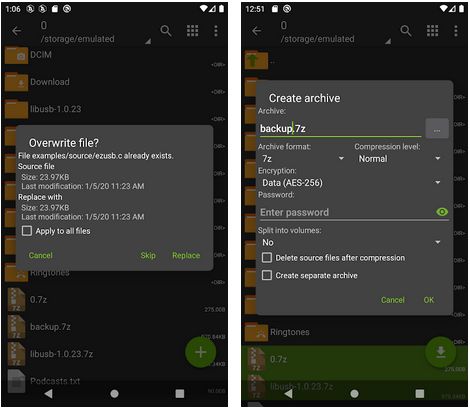
This app allows its user to operate in multiple parts either to compress or extract, which means you can extract a file that is split into various parts. It also enables its users to compress a file into multiple compressed parts. You can compress or extract plenty of file formats with Zarchivers APK.
Edit Archives
Zarchiver Apk enables its users to open, view, and edit various formats of Z files. The formats of files that can view & edit with this app on an android mobile include cab, zip, rar, 7zip, g, XZ, Z, arj, lzh, alz, egg, tbz, tgz, ntfs,7zip, XZ, gzip, Iz4, zip, bz2, zstd, and tar. This app can edit some formats in such a way that the users don’t need to compress & decompress again and again to edit. So extract, remove portions, or add portions of the file without any inconvenience.
Protect Your Archives
This app is mainly designed for the compression & extraction of files but as I mentioned earlier, this also serves file manager. So you can keep your archives in this app. If your archives are of sensitive quality, then you can set a password to protect your archives in this app. This app keeps all your archives secure and private in this protection lock.
Easy & Simple IU
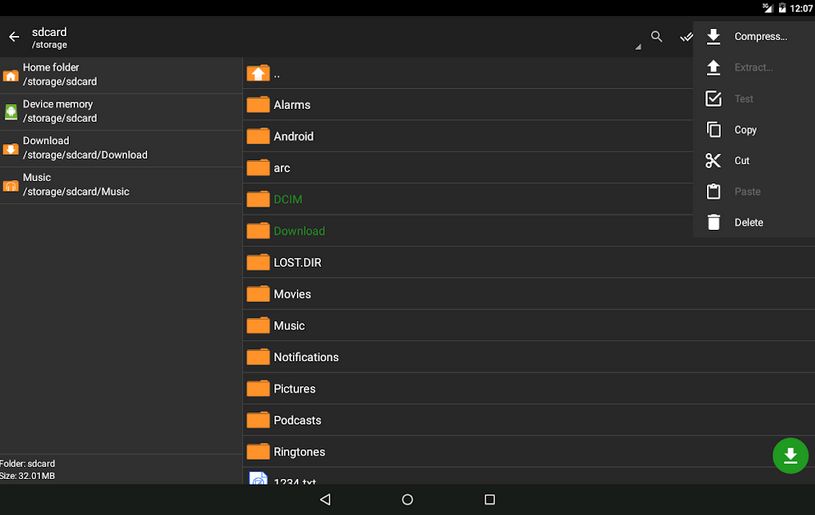
The user-friendly interface of the app makes it simple and easy to use. The app has simply organized functions with easy access to all your files and archives. Moreover performing various functions is also very easy. You can just press the file to get all the options about the file whether to compress, decompress, open, view, or edit the file.
Free of cost
This app does not cost you even a penny as this is absolutely free to download and use. This app also does not contain any sort of premium features for which you have to pay.
No Need for Internet
This app works without the internet and can compress, decompress, zip, unzip, create or edit an archive. So you can edit, open, create, compress/decompress files anywhere, anytime, and in any file format without any sort of wifi or other internet connection.
No Ads
As this app does not require any sort of internet connection for its function so there is no concept of advertisements to bother you while working with this app.
Download & Installation
Users can get this Zarchivers APK by clicking on the download button. It takes a few seconds to download due to the small size of the apk file. Once the download is complete you just open it and click on the install button. If it asks to allow permission for installation from an unknown source then allow this permission from your mobile setting. After allowing the installation go to file manager open the downloaded file of Zarchiver and click on the install.
After completion of the installation process open the app and allow permissions for this app to access your memory of mobile as well as SD card. You just have to allow these permissions once when you set up the installation. This app won't ask you to allow this access every time you open it.
Conclusion
After going through this article one can easily conclude this app is one of the best archivers ever on the android platform for the mobile to compress, decompress, zip, unzip, create, view, or edit archives. This app also protects your archives with a powerful protection lock. This also serves as a file manager for your archived files. So grab the Zarchiver APK from here and get going with the amazing features of this app.













Comments